
SMS Terms & Consent
People Trust Account Security Alerts
About this program
Consent language
The following statement appears next to an unchecked checkbox on the enrollment screen. A customer must tick the box before the option to enable SMS verification becomes available.
By selecting SMS authentication, I consent to receive automated authentication and security text messages from People Trust at the mobile number provided. Message frequency varies based on authentication activity. Message and data rates may apply. Reply HELP for help or STOP to opt out. Privacy Policy | Terms of Service
Enrollment on the People Trust website
Path: Account settings → Security → Two-step verification → Text message (SMS)
- Sign in at www.peopletrustloans.org and open Account settings from the profile menu.
- Choose the Security tab.
- Under Two-step verification, select Text message (SMS) verification. It is off by default and optional.
- Type the mobile number that should receive codes. The number is never pre-filled.
- Read the consent statement and tick the checkbox. The checkbox is unchecked by default.
- Select Turn on SMS verification. The button stays disabled until the box is ticked.
- Enter the one-time code we text you to confirm the number. Verification is on only after this step.
The enrollment block below is the same component customers see inside their account. It is shown here for review only and does not send anything.
Account settings › Security › Two-step verification
Enrollment in Online Banking
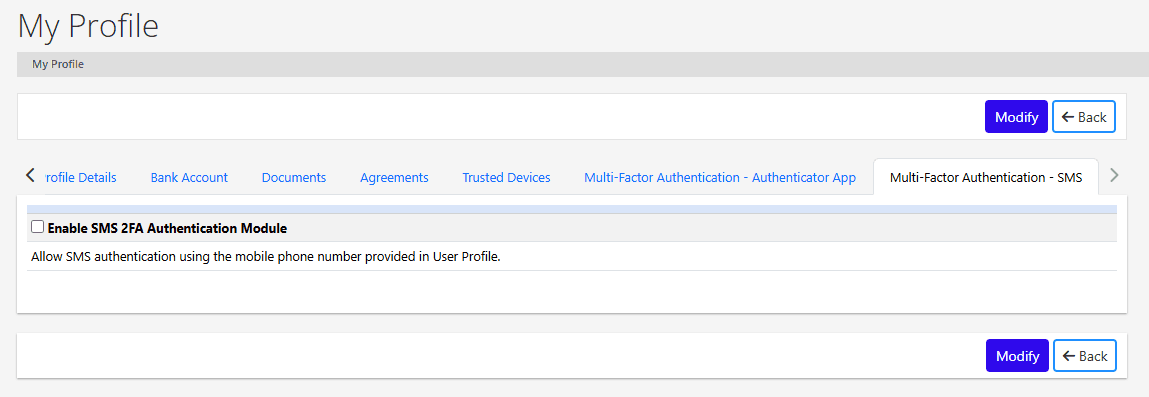
Path: My Profile → Multi-Factor Authentication - SMS → Enable SMS 2FA Authentication Module
- Sign in to People Trust Online Banking from the Dashboard and open My Profile.
- Select the Multi-Factor Authentication - SMS tab. An Authenticator App tab is offered alongside it, so SMS is one optional method, never required.
- Tick Enable SMS 2FA Authentication Module. The box is unchecked by default. Codes go to the mobile number held in the customer's User Profile, which the customer entered and can change on the Profile Details tab.
- Select Modify to save. SMS verification is active only after this step, and unticking the box and saving turns it off again.
Messages you may receive
- People Trust: Your verification code is 482913. It expires in 10 minutes. Do not share this code. Reply STOP to opt out.
- People Trust: SMS two-step verification is now on for your account. Msg&data rates may apply. Reply HELP for help, STOP to opt out.
- People Trust: You have opted out of security text messages. Two-step verification by SMS is now off for your account. No more messages will be sent.
- People Trust: Security code messages only. For help call 501-476-3910 or email info@peopletrustloans.org. Msg&data rates may apply. Reply STOP to opt out.
Message frequency varies with sign-in activity. Message and data rates may apply.
Opting out and getting help
- Reply STOP to any message to opt out. We send one confirmation text and then no further messages. SMS two-step verification is turned off for the account.
- Reply HELP for assistance, or contact us at info@peopletrustloans.org or 501-476-3910.
- You can also turn SMS verification off from Account settings → Security at any time.
- Carriers are not liable for delayed or undelivered messages.
Privacy
Mobile numbers collected for SMS verification are used only to deliver security codes and related notices. Mobile information will not be shared with third parties or affiliates for marketing or promotional purposes. See our Privacy Policy and Terms of Use.